This guide explains how to generate and manage API keys for authenticating requests to our API. Proper use of API keys is critical for securing your application and controlling access.
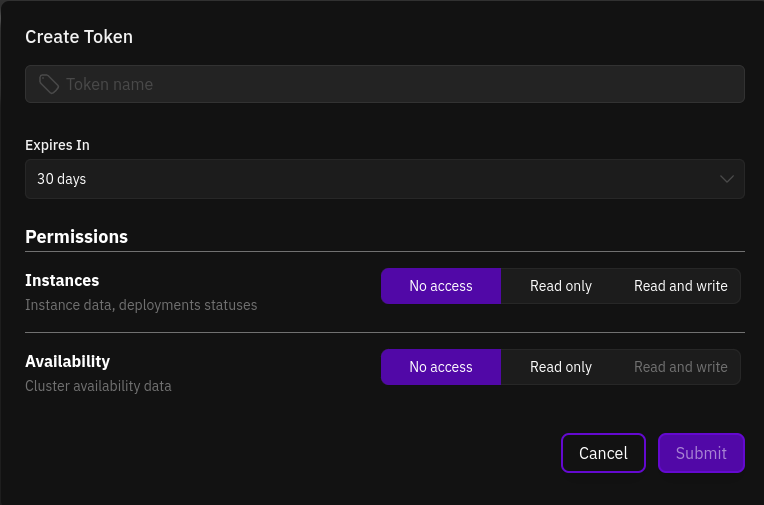
To generate API Key, navigate to Settings -> API Keys, and click the Generate New Key + button.You can assign fine-grained permissions to each key, allowing you to create multiple keys with specific scopes or roles. This enhances the security of your application by limiting each key’s responsibilities. Additionally, you can set an expiration date for each key. We strongly recommend always setting an expiration date to avoid using indefinitely valid keys.
Ensure that all API keys are stored securely and never shared in untrusted environments or with third-party applications.
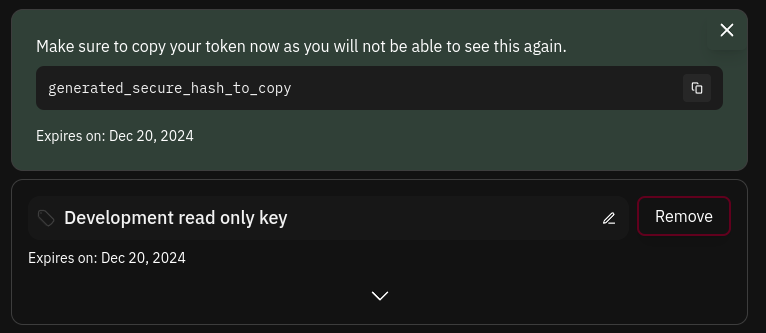
Once a key is generated, you will be able to copy it for immediate use.
The key value is displayed only once. If you lose it, you will not be able to retrieve it again.
For Traces SDK and CLI operations, create a key with the required Prime Traces read/write permissions. Confirm the personal or team workspace as well as the key permissions. See Traces authentication and workspace selection.
Was this page helpful?
Assistant
Responses are generated using AI and may contain mistakes.